
NightWin Casino Account: Registration, Login and KYC Verification
This page covers the complete account lifecycle at NightWin Casino: how to create an account, what the sign-up form looks like and which fields it contains, the bonus selection step that happens before the form is submitted, how to log in using any of the three supported credential types, what to do when login fails, how to recover a forgotten password, what identity verification involves and when it is triggered, and the security measures that protect the account between sessions.
The detail here draws from NightWin's published information and from the registration and login screens visible in the app UI. Where a specific detail is confirmed on a screenshot - a field label, a button name, a visible option - it is described as such. Where information is not published, this page says so rather than filling the gap with assumptions.
For context on the platform itself - licensing, game library, bonuses and payments - the NightWin Casino overview covers all of these separately.
NightWin Account Reference: Key Parameters
Confirmed from published source data and UI screenshots. Entries marked "not published" indicate the information is absent from NightWin's accessible documentation.
| Parameter | Value |
|---|---|
| Registration Fields | Email, Phone number (+44 UK, country selector available), Password |
| Social Login (Google / Facebook) | Not available |
| Login Credential Options | Email address, Phone number, Username |
| Promo Code Entry at Sign-Up | Yes - SPECIAL OFFER tab in bonus selector |
| Email Confirmation Required | Yes - activation link sent after form submission |
| Two-Factor Authentication | not published |
| KYC Trigger | Before first withdrawal |
| KYC Documents Required | Government-issued photo ID and proof of address |
| KYC Selfie Requirement | not published |
| Password Recovery Channels | Email or phone number |
| Account Deletion Process | not published - contact support |
| Login Block After Failed Attempts | Yes - temporary block; wait and retry or reset password |
How to Register at NightWin Casino: A Step-by-Step Guide
Creating an account at NightWin is a single continuous process that begins with the bonus selector and ends with an email confirmation. The sequence takes a few minutes and does not require any documents at this stage - identity verification comes later, when a first withdrawal is requested rather than at the point of sign-up.
- Navigate to nightwin-casino.org.uk and tap the Sign Up button, which appears in the top-right corner of the site alongside the Log In option.
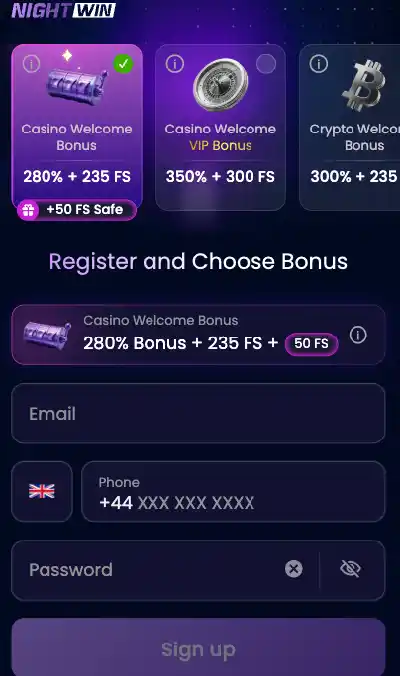
- The bonus selection carousel opens first, before the account details form. Swipe horizontally to see all available options: Casino Welcome Bonus (280% + 235 FS), VIP Welcome Pack (350% + 300 FS), Crypto Welcome Bonus, Sports Welcome Bonus, Claim Bonus Later (labelled JUST PLAY), and a Promo Code entry tab (labelled SPECIAL OFFER). Tap your preferred option - a green tick marks the active selection.
- Complete the three fields below the carousel: your email address, your phone number (the UK +44 country code is pre-selected, with a country picker available for non-UK numbers), and a password. The password field includes a show/hide eye icon to toggle character visibility.
- Tap Sign Up to submit the form.
- Open the confirmation email from NightWin and follow the activation link. The account is live after this step.
No checkbox for Terms and Conditions acceptance was visible on the sign-up screenshots available, though standard casino practice includes T&C agreement. Players should confirm the current form layout at the time of registration and review the Terms before proceeding.
What Details Do You Need to Create a NightWin Casino Account?
Three fields are required in the registration form: an email address, a phone number with country code, and a password. No social login options are present on the sign-up screen - there is no Google, Facebook or Apple sign-in button. The phone number field uses a country selector, with the United Kingdom (+44) set as the default, which reflects the platform's primary target market. The minimum age for registration is not displayed on the visible sign-up screen; it should be confirmed in NightWin's Terms and Conditions before an account is created.
NightWin Registration Form Fields and Email Confirmation
The form as confirmed from the sign-up screenshots contains exactly three input fields: email, phone and password. This is a notably short form compared to many regulated casino sign-up flows, where address, date of birth and full name are collected upfront. At NightWin these details are collected at the verification stage rather than at registration, which makes the initial sign-up faster but means the account cannot be used for withdrawals until verification is completed later. After the Sign Up button is tapped, NightWin sends a confirmation link to the provided email. The account is inactive until this link is followed; clicking it completes the creation process and the full platform becomes accessible.
Selecting a Bonus and Entering a Promo Code When Registering at NightWin
The bonus selection step is the first thing presented after tapping Sign Up, appearing before the account details form rather than after it. This design means the bonus choice is locked in before the account exists - it cannot be changed once the form has been submitted. Players who want to compare the options before committing should do so at this step.
By observation, presenting the bonus selector ahead of the credentials form is an intentional design choice that encourages players to engage with the offer structure before they are committed to a specific account. The downside is that a player who selects an offer quickly to get to the form and later wants a different one will need to contact support rather than making a self-service change.
Which Welcome Bonus Can You Select During NightWin Registration?
Six options are visible in the bonus carousel on the sign-up screen. The Casino Welcome Bonus (280% match plus 235 free spins plus 50 safe free spins) is shown as the default selected option, indicated by a green tick icon on the card. The VIP Welcome Pack (350% plus 300 free spins) is the adjacent card to the right. Scrolling further reveals the Crypto Welcome Bonus option, the Sports Welcome Bonus, the Claim Bonus Later card (labelled JUST PLAY - which skips the bonus entirely and keeps the deposit as immediately withdrawable real money), and the Promo Code tab. All six options are accessible before any account credentials are entered.
How to Enter a NightWin Promo Code During the Sign-Up Process
The promo code entry is presented as a distinct tab in the carousel labelled SPECIAL OFFER, positioned after the standard welcome package options. Tapping this tab opens the code entry field. The code must be entered at this point in the sign-up flow; once the form is submitted with a different option selected, the promotional offer linked to a code cannot be applied retroactively to the account. Players with a promo code should scroll to the SPECIAL OFFER tab before filling in the email, phone and password fields, since the code input and the form submission are part of the same uninterrupted sequence.
How to Log In to NightWin Casino
Logging in to NightWin requires only a credential and a password. The login button sits in the top-right corner of the site on both desktop and mobile, and tapping it opens the sign-in form directly without any intermediate steps. There are no separate login pages for mobile or desktop - the process is consistent across devices and access methods.
Which NightWin login method is most practical for regular use? Email is typically the most reliable long-term credential because it is stable - phone numbers change and usernames can be forgotten. If you registered with a phone number as the primary contact, verify that the same number is still active before relying on it for password recovery as well as login. Using an email address for both login and password recovery keeps those two functions on a single consistent contact point.
NightWin Login Methods: Email, Phone Number or Username
Three credentials are accepted at the NightWin login screen: the email address registered at sign-up, the phone number provided during registration, or a username if one was set up on the account. All three reach the same account and carry the same access rights once authenticated. There is no published information about a "remember me" function on the login screen, and no two-factor authentication step was described in NightWin's published documentation, though this should be checked in the current platform as it can be added without a public announcement. The login page also includes the password recovery link for players who cannot remember their credentials.
What Happens Immediately After Logging In to NightWin Casino?
After a successful login NightWin opens the main account area without any intermediate screen. The casino lobby, sportsbook, cashier, bonus dashboard and Night Club section are all accessible immediately from the bottom navigation bar - no secondary confirmation step or account menu navigation is required to reach any of them. This matches the platform's stated design priority of keeping account access fast, and it is consistent with what the mobile interface shows: the Casino, Sports, Night Club and menu tabs are live from the first screen after authentication.
NightWin Casino Login Problems and How to Resolve Them
Most login failures at NightWin stem from credential errors rather than technical platform issues. The platform applies a temporary security lock after multiple consecutive failed attempts, which is standard practice at licensed casinos to prevent automated access attempts. Understanding the most common causes before encountering them prevents unnecessary frustration.
My NightWin Account Is Blocked: Causes and How to Regain Access
Accounts at NightWin are temporarily restricted after a series of failed login attempts. The block is a security measure rather than a permanent suspension - it lifts after a short waiting period under normal circumstances. If waiting does not resolve the issue, initiating a password reset through the recovery function is the next step, as this resets the failed-attempt counter alongside the credential. Accounts can also be restricted for reasons unrelated to login failures, such as unusual transaction patterns or pending verification. In those cases the support team is the appropriate contact, since account restrictions of that type cannot be resolved through a self-service password reset.
NightWin Login Not Working: Common Causes and Fixes
The most frequent causes of login failure, in order of occurrence at most casino platforms, are: entering the wrong credential type (using a username in the email field, or an email in the phone field), a typing error in the password, a caps-lock issue affecting password capitalisation, and using a credential from an account on a different NightWin domain (several non-official NightWin-branded domains exist). Confirming that the URL in use is nightwin-casino.org.uk before entering credentials eliminates the domain confusion issue entirely. If none of these explain the failure and the account is confirmed to exist at the correct domain, the live support chat is the fastest resolution route.
How to Reset a Forgotten NightWin Casino Password
Password recovery at NightWin is available through both the registered email address and the registered phone number. The process does not require contacting support and typically completes within a few minutes.
- Open the NightWin login screen at nightwin-casino.org.uk and locate the password recovery link, typically positioned below the password entry field.
- Select the recovery channel - email or phone - and enter the corresponding registered contact detail.
- A reset link or code is sent to the provided contact. The exact format (link vs code) and delivery time depend on the channel selected and network conditions.
- Follow the link or enter the code to reach the password reset screen.
- Enter and confirm a new password. The account becomes accessible immediately using the updated credential.
NightWin Forgot Password: Recovery Steps via Email or Phone
Both recovery channels - email and phone - reach the same outcome: a way to set a new password without knowing the existing one. Email recovery typically delivers a clickable link; phone recovery typically delivers a short verification code by SMS. Neither channel requires contacting the support team unless the registered email address and phone number are both inaccessible, at which point manual account recovery through live chat is the only available route. Players who have changed their phone number since registration and have not updated it on the account should ensure the email address remains current as the backup channel.
How Long Does the NightWin Password Reset Process Take?
Recovery completes within a few minutes in most cases, according to NightWin's published information. The email delivery time depends on the receiving mail server's processing queue, which occasionally adds a few extra minutes; checking the spam or junk folder is worth doing if the email does not arrive within five minutes of the request. SMS delivery is generally faster than email for the code itself, though it depends on mobile network conditions. The reset link or code has a validity window - a specific duration is not published by NightWin, which means players should complete the reset promptly after receiving it rather than leaving it for later.
How Does NightWin Casino Account Verification (KYC) Work?
NightWin's identity verification process runs under its published AML/KYC Policy and activates before a first withdrawal is processed. Verification is not required to register, deposit or play; it becomes mandatory at the point where funds need to leave the account for the first time. Completing the KYC check proactively, shortly after registration, removes the delay that arises when verification is triggered at the withdrawal stage.
Players who want to understand how the payout process works after verification is complete - including which payment methods are available and what timelines to expect - can refer to the NightWin payment methods and withdrawals section.
What Documents Does NightWin Casino Require for KYC?
Two documents are required: a government-issued photo ID and a proof of address. The photo ID can be a passport, national identity card or driving licence. Proof of address is typically a recent utility bill, bank statement or official letter showing the player's name and current residential address. Both documents must match the details entered during registration - discrepancies between the name on the ID and the name on the account flag the submission for additional review. Whether NightWin requires a selfie alongside the document images is not stated in the published documentation, so players should be prepared for that possibility when submitting.
When Does NightWin Trigger the Account Verification Process?
The confirmed trigger is the first withdrawal request. Until a withdrawal is submitted, the account can operate - accepting deposits and playing all games - without identity verification being completed. Once a withdrawal is requested, NightWin holds the payout until the KYC documents are reviewed and the account passes the check. The duration of the review process is not published as a specific timeframe, so players who need funds quickly after a winning session benefit from completing the verification step before requesting the withdrawal rather than doing both simultaneously. Verifying in advance also means subsequent withdrawals process without the identity check step adding additional time.
NightWin Account Settings: Changing Password and Managing Profile
Account settings at NightWin cover the standard management functions: updating credentials, reviewing personal details and configuring responsible gambling limits. These are accessible through the account menu once logged in and do not require contacting support for routine changes.
How to Change Your NightWin Casino Password from Account Settings
Navigate to the account settings menu after logging in and locate the security or password section. Enter the current password to confirm identity, then enter and confirm the new password. The change takes effect immediately and the new credential applies to all subsequent logins across all devices. Players who are logged in on multiple devices at the time of the change may be logged out of other sessions automatically, depending on how the platform handles session invalidation on credential updates.
Can You Delete Your NightWin Casino Account?
The account deletion or closure process is not described in NightWin's published documentation. There is no confirmed self-service account deletion option in the account settings menu based on available information. Players who wish to close their account should contact the live support team to initiate the process. Self-exclusion, which blocks access without permanently removing the account, is a confirmed option covered in the responsible gambling section of the platform. Players motivated by problem gambling concerns may find self-exclusion more appropriate than account deletion, as it is specifically designed for that purpose and can be activated faster than a formal account closure.
NightWin Casino Account Security: Protecting Your Login
NightWin's account security layer operates at three levels: the encryption protecting data in transit, the platform-side session and activity monitoring, and the player-side credential management. Each level addresses a different category of risk.
Does NightWin Casino Offer Two-Factor Authentication?
Two-factor authentication is not mentioned in NightWin's published documentation, and no 2FA prompt is visible in the available screenshots of the login and registration flows. This means it is either not implemented or not publicised in accessible materials at the time of writing. Players who specifically require 2FA as a security feature should contact NightWin's support team to confirm the current status before relying on it as part of their account security setup. The absence of confirmed 2FA is a gap worth acknowledging: it means the account security depends on password strength and the platform's own detection systems rather than a second authentication factor under the player's control.
How NightWin Casino Detects and Responds to Suspicious Account Activity
NightWin monitors login patterns and account activity for behaviour that deviates from established norms. If a login attempt comes from an unrecognised device, a new location or involves activity patterns inconsistent with the account's history, the system can request additional verification before granting access. The specific triggers for this monitoring are not published in detail, which is standard practice - disclosing the exact thresholds would allow them to be engineered around. Players who encounter a verification request they did not expect should complete it through the official NightWin interface rather than via any third-party link, since phishing attempts targeting casino accounts typically mimic this kind of prompt. Any unexpected account restriction should be reported to the support team directly.
Where NightWin's Account Information Has Gaps
Three areas of the account management experience are not covered in NightWin's published documentation, and they are worth noting clearly.
The first is two-factor authentication. Its presence or absence is unconfirmed. For players who treat 2FA as a non-negotiable security requirement, contacting support before registration to get a definitive answer is more reliable than assuming either way.
The second is the account deletion process. No self-service closure path is documented. Players who want the ability to permanently close an account without going through support - a reasonable expectation at a licensed platform - will not find it described in publicly accessible materials. This is a functional gap rather than a security one, but it affects how much control a player has over their own data and account status.
The third is the KYC review timeline. NightWin does not publish a specific turnaround time for identity document review, which makes it difficult to plan around a first withdrawal. Players submitting documents before their first deposit - rather than waiting until they want to withdraw - remove this uncertainty from the equation entirely.
What the Account Process at NightWin Looks Like in Practice
NightWin's registration flow is short: three fields, a bonus selection and an email confirmation. The login is equally direct, accepting any of three credential types with no multi-step authentication process in the published flow. Password recovery works through either the registered email or phone number and completes in minutes under normal conditions.
The KYC process is where most new players encounter their first friction, typically because they attempt a withdrawal before submitting documents and then need to wait for the review to complete. Submitting photo ID and proof of address shortly after registration - before a withdrawal becomes necessary - converts that friction from an urgent obstacle into a background admin step. For players planning to claim a NightWin welcome bonus and work through the wagering requirement before withdrawing, this timing makes particular sense: the verification can complete during the wagering period so the payout is not delayed when the requirement is met.