
NightWin Casino Mobile App: Android APK v1.3.9 and Browser Play
Mobile access to NightWin Casino comes in two forms. Android users can download an APK file directly from the casino's official site - version 1.3.9, 6.58 MB - and install it outside the Google Play Store. iOS users, along with Android players who prefer not to install anything, access the full platform through a standard mobile browser with no download required. Both routes land on the same product: all casino games, the sportsbook, the cashier and account management operate identically whether accessed via the app or a browser window.
This page covers the practical side of both options. The APK installation process, the technical profile of the application, how iOS access works, what the mobile platform delivers in terms of game availability and streaming, and where the limits of the mobile experience lie. For a broader overview of the platform itself, the NightWin Casino overview covers licensing, bonuses and full product details alongside mobile.
NightWin Mobile at a Glance
Confirmed from APK analysis and published source data. Entries marked "not published" are absent from NightWin's public documentation.
| Parameter | Value |
|---|---|
| APK Version | 1.3.9 |
| APK File Size | 6.58 MB |
| Package Name | com.casino.nightwincasinoorg |
| App Architecture | WebView wrapper (AndroidX, Material Design libraries) |
| iOS App Store Listing | Not available |
| iOS Access Method | Mobile browser (Safari, Chrome or equivalent) |
| Android Access Methods | APK or mobile browser |
| Live Stream Quality | 720p or higher on 4G and Wi-Fi |
| Installation Required | No - browser version requires no download |
| Full Feature Parity | Yes - casino, sportsbook, cashier all available on mobile |
NightWin Casino Android App: APK Download and Installation
The NightWin Android application is distributed as an APK file from the casino's own domain rather than through the Google Play Store. This means the installation process requires one extra step compared to a standard Play Store download: enabling installation from sources outside Google's official marketplace. The APK itself is lightweight at 6.58 MB, so the download completes quickly even on a mobile data connection.
Distributing via direct APK rather than through the Play Store is common among online casino operators because Play Store policies restrict real-money gambling applications in certain regions. It is not an indicator of security risk when the source is the casino's verified official domain.
Where to Download the Official NightWin APK File for Android
The APK is available from nightwin-casino.org.uk, which is the only verified source. Third-party APK repositories exist for many casino applications and carry a meaningful risk of modified files that may contain unwanted software or altered code. Downloading from any source other than the official domain is not advisable. Once the file is saved to the device, the installation follows the standard Android sideloading process. The file name from the official source matches the package identifier com.casino.nightwincasinoorg, which serves as a check that the correct file has been obtained before installation begins.
How to Install NightWin APK on Android: Step by Step
Installing the APK requires enabling installation from unknown sources, which Android restricts by default to prevent accidental installation of untrusted software.
- Open your Android device's Settings, navigate to Security (or Privacy on newer Android versions) and enable installation from unknown sources, or allow it specifically for your browser app when prompted during the install attempt.
- Download the NightWin APK from nightwin-casino.org.uk. The file saves to your Downloads folder automatically.
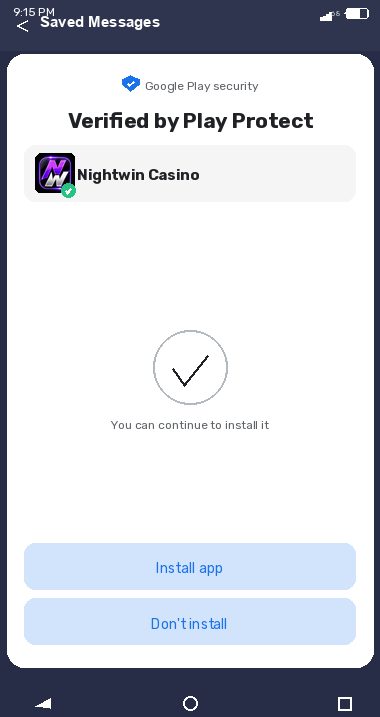
- Open the downloaded file using a file manager or the notification bar download shortcut. Android will prompt you to confirm the installation; tap Install to proceed.
- Once installed, the NightWin app appears in your app drawer. Open it, log in with your existing credentials or complete registration if you are a new player, and the full casino and sportsbook are available immediately.
If Android displays a warning about the file being from an unknown source, this is the standard system prompt for any APK installed outside the Play Store - it is not specific to NightWin. Confirm that you obtained the file from the official domain before tapping Install Anyway.
NightWin APK Technical Specifications
The NightWin APK is a WebView wrapper application. This architecture means the app loads the casino's mobile website inside a native Android container rather than running independently coded native functions. The result is a product that behaves identically to the browser version of the site, with the convenience of a home screen icon and an Android application shell around it.
NightWin APK Version 1.3.9: Size, Package Name and Android Requirements
The confirmed build is version 1.3.9, with a file size of 6.58 MB and a package identifier of com.casino.nightwincasinoorg. The APK uses AndroidX libraries and Google's Material Design component set, which are standard Android development frameworks supported across all modern Android devices. The small file size reflects the WebView architecture: because the application loads the casino site from the web rather than bundling game content locally, the installed application occupies minimal storage. The minimum Android version required for installation is not stated in the published documentation; the Material Design and AndroidX libraries used are compatible with Android 5.0 and above as a general baseline.
Is the NightWin Casino APK Safe to Download and Install?
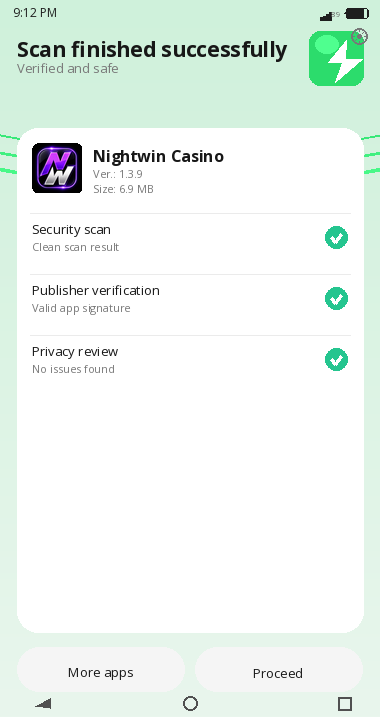
The APK distributed from nightwin-casino.org.uk is the reference source. The file itself is a standard Android application, and the WebView architecture means it loads the same SSL-secured site that browser users access, with no proprietary data handling layer sitting between the user and the web-based platform.
The main security variable in APK installation is provenance - where the file actually came from - rather than the APK format itself. An APK from the official domain runs NightWin's mobile web experience inside an Android shell. An APK from a third-party mirror may have been modified. Confirming the source URL before downloading, and cross-checking the package name against com.casino.nightwincasinoorg after installation, are the two practical checks that close the main risk gap.
NightWin Casino on iPhone and iPad: iOS Mobile Play
NightWin does not have a listed application on the Apple App Store. iPhone and iPad users access the casino through any compatible mobile browser - Safari, Chrome, Firefox or equivalent - without any installation step. The mobile-responsive design of the NightWin site adjusts automatically to the screen dimensions of whatever iOS device is in use.
This browser-first approach to iOS is increasingly common among online casino operators and carries a functional advantage: it requires no App Store approval cycle, which means the mobile site can be updated without a formal application review process. The practical consequence for players is that the casino experience on iPhone is indistinguishable from the desktop version in terms of feature set, just presented in a portrait-optimised layout.
Does NightWin Casino Have a Native iOS App?
No. There is no NightWin application available for download from the Apple App Store. The entire iOS experience runs through the mobile browser. This is not a limitation on feature access - the NightWin Casino game library , sportsbook, cashier, bonus dashboard and account settings all function fully through Safari or any other iOS browser. The difference is presentation rather than content: instead of an app icon on the home screen, the casino loads as a website. Players who want a home screen shortcut can add the site to the iOS home screen through Safari's Share menu, which creates a shortcut that opens the site directly without going through the browser address bar first.
How to Access NightWin Casino in Safari or Chrome on iPhone
Open Safari or Chrome on the iPhone, navigate to nightwin-casino.org.uk and log in with existing credentials. The site detects a mobile device and presents the responsive layout automatically, with the bottom navigation bar - Menu, Sports, Log In, Casino, Night Club - replacing the desktop header. No settings change is required on the device side. Players who find the address bar takes up too much screen space can switch to landscape orientation for a slightly wider game view, or use Safari's full-screen mode for an unobstructed layout on supported devices.
What Games and Features Are Available on NightWin Mobile?
The mobile version of NightWin delivers the complete product, not a reduced subset. Slots, live casino, RNG table games, mini games, the sportsbook with in-play markets, the cashier and the Night Club loyalty section are all accessible from the mobile interface. The game lobby presents the same category and provider filters available on desktop, so navigation works the same way regardless of screen size. The practical question for mobile casino users is not usually whether features exist but whether they work smoothly at mobile scale. Load times, touch responsiveness and the behaviour of live streaming under real-world connection conditions matter more than the feature list itself. NightWin's WebView architecture means the mobile experience is the web experience rendered on a phone, which translates to consistent behaviour across devices as long as the connection quality supports it.
NightWin Slots and Live Casino on Mobile Devices
Slots load through the mobile browser or APK exactly as they do on desktop, with touch controls replacing cursor input for spinning, adjusting stake and accessing the paytable. The full slot catalogue is available on mobile, including Megaways titles, bonus buy games and the hold-and-respin formats confirmed in the casino lobby. Live casino tables stream through the same 720p-or-above feed used on desktop, with the camera layout adapting to portrait orientation on phones. The minimum stake at standard live tables remains at approximately 0.50 GBP on mobile, as the staking structure is set at the studio level rather than varying by access device.
Does NightWin Mobile Support Sports Betting and the Cashier?
Yes. The sportsbook is fully functional on mobile, with the Sports tab in the bottom navigation bar providing direct access to pre-match markets, in-play betting and virtual sports. The bet builder and accumulator functions work via touch interface. The cashier section handles deposits and withdrawals on mobile using the same payment methods available on desktop - Visa, Mastercard, Google Pay, Apple Pay, bank transfer and cryptocurrency - without any mobile-specific restrictions. Account management, including access to the Night Club section, bonus dashboard and responsible gambling limit settings, is equally available through the mobile interface.
NightWin Mobile Streaming Quality and Performance
Live casino streaming on NightWin mobile runs at 720p or higher, which is a confirmed technical benchmark rather than a marketing claim. The quality holds on both 4G mobile data and Wi-Fi, though actual performance depends on available bandwidth and network stability rather than the stated capability alone.
NightWin Live Casino Stream Quality: 720p+ on 4G and Wi-Fi
A 720p stream requires a sustained download speed of approximately 3-5 Mbps for smooth playback without buffering interruptions. Standard UK 4G connections deliver this comfortably in most urban and suburban areas, making live roulette, blackjack and baccarat sessions on mobile a realistic proposition rather than a compromise. Wi-Fi performance at home is typically more stable than mobile data, which reduces the incidence of brief quality drops during a session. The multi-camera live studio setup used in NightWin's live casino means the feed cuts between angles during game events, which adds brief transition moments that a slower connection may buffer slightly during.
Does the NightWin Mobile Casino Work on Slower Connections?
For slots and RNG table games, the connection requirement is low - these load the game content initially and then operate largely offline until the result is submitted, so a modest 4G or even 3G connection is sufficient for uninterrupted play. Live casino streaming is the most bandwidth-demanding feature on the platform; a connection below 3 Mbps sustained will produce visible quality reductions or occasional buffering. The NightWin stream does not offer a manual quality selector in the published interface, so the platform manages quality automatically rather than allowing the player to step down to a lower resolution on a weak connection. Players in areas with inconsistent mobile data will find the slot and table game sections more reliable than live streaming on poor connectivity.
NightWin Mobile App vs Browser Version: What Is the Difference?
Because the NightWin Android APK is a WebView wrapper, it loads the same web-based platform as a mobile browser does. The functional difference between the two access methods is close to zero; the differences that do exist are at the convenience level rather than the feature level.
The WebView architecture is worth understanding before deciding between the APK and browser. You are not getting a faster, more optimised experience by installing the app - you are getting a shortcut. The APK opens the NightWin mobile site in an Android wrapper, which means it is subject to the same network conditions, the same game load times and the same site updates as the browser version. The benefit is the home screen icon and the avoidance of the browser address bar; that is the full extent of the difference. - practical note
Which NightWin Mobile Features Are Identical on App and Browser?
Every feature available through the APK is available through a mobile browser and vice versa. The casino lobby, sportsbook, live casino, cashier, bonus dashboard, Night Club section and account settings load through both access methods from the same underlying platform. Game performance, streaming quality and session stability are governed by the connection and device rather than by which delivery method is used. The only consistent differences are cosmetic: the APK presents without a browser address bar and with a home screen icon, while the browser version retains the browser chrome around the page.
Is the NightWin Browser Version Better Than the Android APK?
For most players, the browser version is marginally more practical because it requires no installation steps and works on both Android and iOS without any platform-specific action. The APK provides the same product with the convenience of a dedicated icon and the ability to run the casino without the browser interface visible around it. Neither is technically superior in performance terms; the choice comes down to personal preference for how the shortcut to the casino is set up on the device. Players who use both Android and iOS devices will find the browser approach more consistent across platforms than installing the APK on Android and using the browser on iOS in parallel.
How to Log In and Start Playing on NightWin Mobile
Logging in on mobile follows the same process as on desktop. The login button appears in the top right of the NightWin mobile site, or in the bottom navigation bar as Log In on the APK version. Three credential types are accepted, and the session persists between visits on the same device unless the player actively logs out.
For the full detail on login options, password recovery and account verification - including which documents NightWin requires before a first withdrawal - the NightWin account registration and login section covers the complete account management flow.
NightWin Mobile Login: Email, Phone Number and Username Options
All three credential types that work on desktop function identically on mobile: the registered email address, the phone number used at sign-up, or the account username. There is no mobile-specific login method, no PIN or biometric shortcut published in the platform's documentation, and no separate mobile credential from the main account login. The password show/hide toggle on the login form is present on the mobile interface, which is a small but useful detail on a touchscreen where typing errors are more common.
How to Set Up NightWin Casino on Your Phone for the First Time
Whether arriving via the APK or a browser, the setup sequence on a new device is the same. Navigate to nightwin-casino.org.uk, tap the Log In button if you have an existing account or the Sign Up option if you are registering for the first time. Registration on mobile presents the same form as on desktop - email address, phone number with UK +44 country selector, password, and the bonus selection carousel where the opening offer is chosen. After the account is created and the email confirmation link is followed, the full mobile platform is available without any additional mobile-specific configuration.
Where the NightWin Mobile Experience Has Limits
Three scenarios exist where mobile access to NightWin delivers a noticeably different result from what a player might expect on desktop.
The first is the APK architecture. Because the application is a WebView wrapper rather than a native casino app, it does not benefit from the performance optimisations that natively coded applications can achieve. On older or lower-specification Android devices, the web-based platform loaded inside the app may feel slower than a dedicated native app would on the same hardware. Players on budget Android phones should test the browser version directly before deciding whether the APK wrapper adds useful value for their device.
The second is live casino on unstable connections. The 720p streaming benchmark requires consistent bandwidth, and there is no manual quality control in the published interface. A session that begins on good Wi-Fi and then moves to a weaker mobile signal may experience buffering without a way to reduce quality to maintain continuity. Slots and RNG games are unaffected by this, but regular live casino users who move between connection environments during a session will notice it.
The third is the absence of any iOS native app. Players who are accustomed to native casino applications on iPhone - with the reliability and polished interface that a purpose-built app provides - will find the browser experience at NightWin functional but less visually integrated than a native product. The home screen shortcut from Safari partially addresses this, but it is not equivalent to a dedicated App Store application.
The Mobile Verdict for NightWin
NightWin's mobile offering is complete in terms of content - everything available on desktop is accessible on a phone - and technically adequate for the majority of use cases. The APK is a lightweight download that installs quickly, and the browser approach serves iOS users without friction. The 720p live streaming benchmark holds on standard 4G, which means live casino sessions on mobile are a realistic daily use case rather than a desktop-only activity.
The gaps are real but narrow. The WebView architecture means the APK is a convenience wrapper rather than a performance advantage, the absence of an iOS native app matters to players who prefer that format, and live streaming on poor connections is the one scenario where the mobile experience falls short of desktop. For the broad majority of play styles - slots on the commute, a live roulette session on Wi-Fi at home - the platform delivers what it promises.